Task scheduling
This document is obsolete from v3.6.0.
@midwayjs/task is a module to solve task series, such as distributed scheduled tasks and delayed task scheduling. For example, daily regular report mail delivery, order failure after 2 hours, etc.
Distributed scheduled tasks depend on bull, which is implemented through redis. Therefore, additional Redis needs to be configured in the configuration. Local scheduled tasks are based on Cron module and do not need additional configuration.
Related information:
| Description | |
|---|---|
| Can be used for standard projects | ✅ |
| Can be used for Serverless | ❌ |
| Can be used for integration | ✅ |
Other
| Description | |
|---|---|
| Can be used independently as the main frame | ✅ |
| Contains custom logs | ✅ |
| Middleware can be added independently | ❌ |
Installation dependency
First install the task components provided by Midway:
$ npm install @midwayjs/task@4 @types/bull --save
Or reinstall the following dependencies in package.json.
{
  "dependencies": {
    "@midwayjs/task": "^4.0.0",
    // ...
  },
  "devDependencies": {
    "@types/bull": "^3.15.8 ",
    // ...
  }
}
Introducing components
In configuration.ts, introduce this component:
// src/configuration.ts
import { Configuration } from '@midwayjs/core';
import * as task from '@midwayjs/task'; //Import module
import { join } from 'path';

@Configuration({
  imports: [task],
  importConfigs: [join(__dirname, 'config')]
})
export class MainConfiguration {
}
Distributed timing task
This is our most common way of timing tasks.
Distributed timed tasks can be distributed across multiple processes and multiple machines can execute a single timed task.
The distributed definition task depends on the Redis service and needs to be applied in advance.
Configuration
Configure the corresponding module information in the config.default.ts file:
// src/config/config.default.ts
export default {
  // ...
  task: {
    redis: 'redis:// 127.0.0.1:32768', // the task depends on redis, so a redis needs to be added here.
    prefix: 'midway-task', // the keys stored in these tasks start with midway-task to distinguish the configurations in the user's original redis.
    defaultJobOptions: {
      repeat: {
        Tz: "Asia/Shanghai" // Task and other parameters such as (0 0 0 * * *) were originally set for 0 o'clock, but because the time zone is not correct, the time zone for domestic users is set.
      },
    },
  },
}
Account password:
// src/config/config.default.ts
export default {
  // ...
  task: {
    // ioredis configuration https://www.npmjs.com/package/ioredis
    redis: {
      port: 6379
      host: '127.0.0.1',
      password: 'foobared',
    },
    prefix: 'midway-task', // the keys stored in these tasks start with midway-task to distinguish the configurations in the user's original redis.
    defaultJobOptions: {
      repeat: {
        Tz: "Asia/Shanghai" // Task and other parameters such as (0 0 0 * * *) were originally set for 0 o'clock, but because the time zone is not correct, the time zone for domestic users is set.
      },
    },
  },
}
Code usage
import { Provide, Inject, Task, FORMAT } from '@midwayjs/core';

@Provide()
export class UserService {
  @Inject()
  helloService: HelloService;

  // For example, the following is executed every minute and is a distributed task
  @Task({
    repeat: { cron: FORMAT.CRONTAB.EVERY_MINUTE}
  })
  async test() {
    console.log(this.helloService.getName())
  }
}
Setting progress
For example, when we do audio and video or publish such time-consuming tasks, we hope to set the progress.
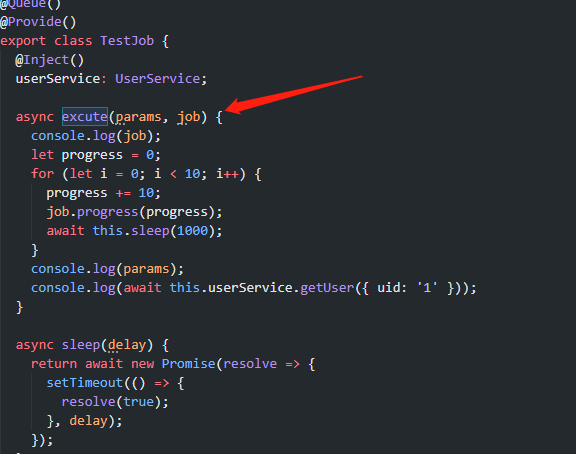
equivalent to the second parameter, the job of bull is passed to the user. Users can set the progress through the job.progress.
Then query the progress:
import { QueueService } from '@midwayjs/task';
import { Provide, Controller, Get } from '@midwayjs/core';

@Controller()
export class HelloController {
  @Inject()
  queueService: QueueService;

  @Get("/get-queue")
  async getQueue(@Query() id: string) {
    return await this.queueService.getClassQueue(TestJob).getJob(id);
  }
}
The relevant content of the task
let job = await this.queueService.getClassQueue(TestJob).getJob(id)
Then there is a similar way to stop or check the progress on the job.
Triggered when started
Some friends hope to perform the corresponding timing tasks immediately after restarting because there is only one machine.
import { Configuration, Context, ILifeCycle, IMidwayBaseApplication, IMidwayContainer } from '@midwayjs/core';
import { Queue } from 'bull';
import { join } from 'path';
import * as task from '@midwayjs/task';
import { QueueService } from '@midwayjs/task';

@Configuration({
  imports: [
    task
  ],
  importConfigs: [
    join(__dirname, './config')
  ]
})
export class MainConfiguration implements ILifeCycle {

  async onServerReady(container: IMidwayContainer, app?: IMidwayBaseApplication<Context>): Promise<void> {

    // Task will be executed immediately after it is started.
    let result: QueueService = await container.getAsync(QueueService);
		// Here the first one is the class name of your task, and the second one is the function name of the decorator Task
    let job: Queue = result.getQueueTask('HelloTask', 'task')
    // Indicates immediate execution.
    job.add({}, {delay: 0, repeat: null})

    // The LocalTask will be executed immediately after it is started.
    const result = await container.getAsync(QueueService);
    let job = result.getLocalTask('HelloTask', 'task'); //Parameter 1: Class Name Parameter 2: Function Name TaskLocal by Decorator
    job(); // indicates immediate execution
  }
}
Common Cron expressions
About Task Task Task Configuration:
*    *    *    *    *    *
┬    ┬    ┬    ┬    ┬    ┬
│    │    │    │    │    |
│    │    │    │    │    └ day of week (0 - 7) (0 or 7 is Sun)
│    │    │    │    └───── month (1 - 12)
│    │    │    └────────── day of month (1 - 31)
│    │    └─────────────── hour (0 - 23)
│    └──────────────────── minute (0 - 59)
└───────────────────────── second (0 - 59, optional)
Common expressions:
- run every 5 seconds:
*/5 * * * * - run every 1 minute:
0 */1 * * * * - run every 20 minutes per hour:
0 20 * * * - run every day at 0 o'clock:
0 0 0 * * - Execute every day at 2:35:
0 35 2 * *
You can use the online tool to confirm the time of the next execution.
Midway provides some commonly used expressions on the frame side for everyone to use in @midwayjs/core.
import { FORMAT } from '@midwayjs/core';

// cron expressions executed per minute
FORMAT.CRONTAB.EVERY_MINUTE
There are some other expressions built in.
| Expression | corresponding time |
|---|---|
| CRONTAB.EVERY_SECOND | Every second |
| CRONTAB.EVERY_MINUTE | Every minute |
| CRONTAB.EVERY_HOUR | Every hour on the hour |
| CRONTAB.EVERY_DAY | 0 o'clock every day |
| CRONTAB.EVERY_DAY_ZERO_FIFTEEN | At 0:15 every day |
| CRONTAB.EVERY_DAY_ONE_FIFTEEN | At 1:15 every day |
| CRONTAB.EVERY_PER_5_SECOND | Every 5 seconds |
| CRONTAB.EVERY_PER_10_SECOND | Every 10 seconds |
| CRONTAB.EVERY_PER_30_SECOND | Every 30 seconds |
| CRONTAB.EVERY_PER_5_MINUTE | Every 5 minutes |
| CRONTAB.EVERY_PER_10_MINUTE | Every 10 minutes |
| CRONTAB.EVERY_PER_30_MINUTE | Every 30 minutes |
Manually trigger tasks
The definition of a task, through the @Queue decorator, defines a task class, which must contain an async execute() method.
import { Provide, Inject, Queue } from '@midwayjs/core';

@Queue()
export class HelloTask {
  async execute(params) {
    console.log(params);
  }
}
Trigger:
import { QueueService } from '@midwayjs/task';
import { Provide, Inject } from '@midwayjs/core';

@Provide()
export class UserTask {
  @Inject()
  queueService: QueueService;

  async execute(params = {}) {
    // Triggers distributed task scheduling after 3 seconds.
    const xxx = await this.queueService.execute(HelloTask, params, {delay: 3000});
  }
}
After 3 seconds, the HelloTask task will be triggered.
Note that if it is not triggered, please check the params above to ensure that it is not empty.
Operation and Maintenance
Log
On the Midway Task Component, two logs have been added:
- midway-task.log
- midway-task-error.log
The corresponding logs are printed when the task, localTask, and queue trigger starts and ends respectively.
Basic configuration of task log:
// src/config/config.default.ts
import { MidwayConfig } from '@midwayjs/core';
export default {
  midwayLogger: {
    default: {
      // ...
    },
    clients: {
      coreLogger: {
        // ...
      },
      appLogger: {
        // ...
      },
      taskLog: {
        disableConsole: false, // whether to disable printing to the console, disabled by default
        level: 'warn',
        consoleLevel: 'warn',
      },
    }
  },
} as MidwayConfig;
Distributed Task Trigger Log:
logger.info('task start.')

// Exception:
logger.error(err.stack)

logger.info('task end.')
Non-distributed LocalTask trigger logs:
logger.info('local task start.')

// Exception:
// logger.error('${e.stack}')

logger.info('local task end.')
Trigger log for task queue:
logger.info('queue process start.')

// Exception:
// logger.error('${e.stack}')

logger.info('queue process end.')
Troubleshoot problem links:
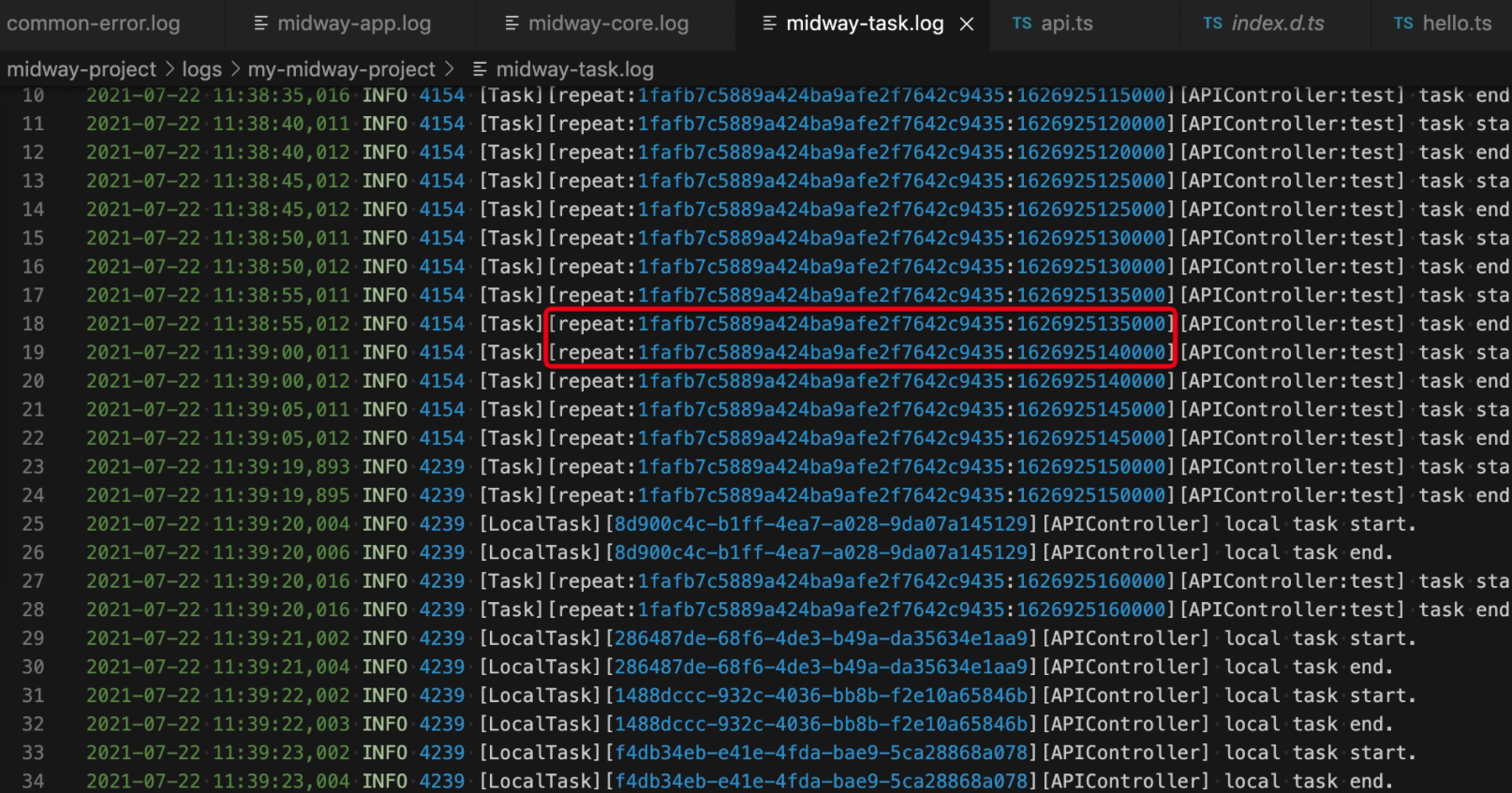 you can search for the same id to find the log of the same request.
In order to facilitate users to concatenate the corresponding logs in their business codes, I hung traceId variables on ctx.
you can search for the same id to find the log of the same request.
In order to facilitate users to concatenate the corresponding logs in their business codes, I hung traceId variables on ctx.
For example, abnormal situation: when abnormal, the local can see this error-related situation in the console and midway-task.log bar:

traceId
The localTask generates a UUID ID as a traceId.
Task and queue use the ID of the job as the traceId.
Code within the business
In the service, you can inject logger through inject or inject ctx to get logger variables.
import { App, Inject, Provide, Queue } from '@midwayjs/core';
import { Application } from "@midwayjs/koa";

@Queue()
export class QueueTask {

  @App()
  app: Application;

  @Inject()
  logger;

  async execute(params) {
    this.logger.info('====>QueueTask execute')
    this.app.getApplicationContext().registerObject('queueConfig', JSON.stringify(params));
  }
}
or
import { App, Inject, Provide, Queue } from '@midwayjs/core';
import { Application } from "@midwayjs/koa";

@Queue()
export class QueueTask {

  @App()
  app: Application;

  @Inject()
  ctx;

  async execute(params) {
    this.ctx.logger.info('====>QueueTask execute')
    this.app.getApplicationContext().registerObject('queueConfig', JSON.stringify(params));
  }
}
Printed log
2021-07-30 13:00:13,101 INFO 5577 [Queue][12][QueueTask] queue process start.
2021-07-30 13:00:13,102 INFO 5577 [Queue][12][QueueTask] ====>QueueTask execute
2021-07-30 13:00:13,102 INFO 5577 [Queue][12][QueueTask] queue process end.
Local timed task
Unlike distributed tasks, local timed tasks do not need to rely on and configure Redis, and can only do single-process tasks, that is, each process of each machine will be executed.
import { Provide, Inject, TaskLocal, FORMAT } from '@midwayjs/core';

@Provide()
export class UserService {
  @Inject()
  helloService: HelloService;

  // For example, the following is executed every minute
  @TaskLocal(FORMAT.CRONTAB.EVERY_MINUTE)
  async test() {
    console.log(this.helloService.getName())
  }
}
Frequently Asked Questions
1. EVALSHA error

This problem is basically clear. The problem will appear on the cluster version of redis. The reason is that redis will hash the key to determine the stored slot. In this step of the cluster @midwayjs/task, the key hit a different slot. The temporary solution is to use the prefix configuration in the task to include , and force redis to calculate only the hash in , for example, prefix: '{midway-task}'.
2. Delete historical log
When Redis is executed every time, he will have a log, so how to delete it after completion:
import { Provide, Task } from '@midwayjs/core';
import { IUserOptions } from '../interface';

@Provide()
export class UserService {
  async getUser(options: IUserOptions) {
    return {
      uid: options.uid
      username: 'mockedName',
      phone: '12345678901',
      email: '[email protected]',
    };
  }

  @Task({
    repeat: { cron: '* * * * * *'}
    removeOnComplete: true // added a line of this
  })
  async test() {
    console.log('====')
  }
}
Whether it is deleted by default, you need to communicate with the user.
3. Configure the Redis cluster
You can use the createClient method provided by bull to access the custom redis instance, so that you can access the Redis cluster.
For example:
// src/config/config.default
import Redis from 'ioredis';

const clusterOptions = {
  enableReadyCheck: false, // must be false
  retryDelayOnClusterDown: 300
  retryDelayOnFailover: 1000
  retryDelayOnTryAgain: 3000
  slotsRefreshTimeout: 10000
  maxRetriesPerRequest: null // must be null
}

const redisClientInstance = new Redis.Cluster ([
  {
    port: 7000
    host: '127.0.0.1'
  },
  {
    port: 7002
    host: '127.0.0.1'
  },
], clusterOptions);

export default {
  task: {
    createClient: (type, opts) => {
      return redisClientInstance;
    },
    prefix: '{midway-task}', // the keys stored in these tasks are all at the same beginning, so as to distinguish the configurations in the user's original redis.
    defaultJobOptions: {
      repeat: {
        Tz: "Asia/Shanghai" // Task and other parameters such as (0 0 0 * * *) were originally set for 0 o'clock, but because the time zone is not correct, the time zone for domestic users is set.
      }
    }
  }
}